The Capstone Hackweekend
28 January, 2019 § Leave a comment
This past weekend Mike Conley and I visited the Capstone team to work one-on-one with the students, teach topics, and share the history of Mozilla.
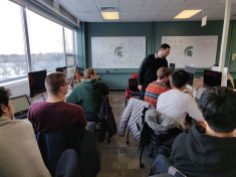
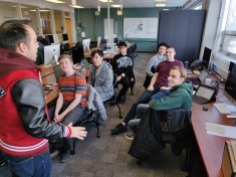
The current capstone project is a continuation from last semesters project. The students are working on converting Firefox’s localization implementation from DTD/properties files to Fluent. Fluent brings with it many new capabilities, such as platform-dependent strings, custom formatters, asynchronous applying of translation, and more.
Last semester’s capstone group migrating parts of Firefox and wrote migration scripts. They also attempted to migrate startup strings and profile the performance implications.
This semester the students are continuing to migrate more parts of Firefox, while also working on our Fluent tools and researching using a faster parser.
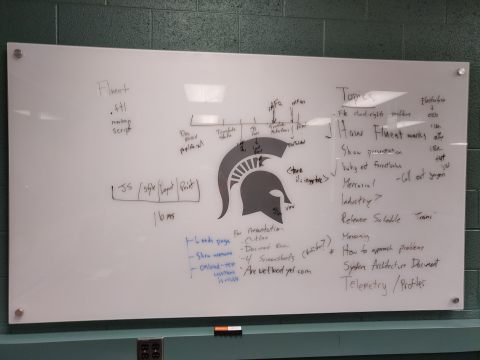
Topics for the weekend
We met the students bright and early Saturday morning at 9am. The first topics that we covered were the page lifecycle as it applies to Fluent translation and comparisons to how DTD and .properties files have their strings applied. We also covered Fluent best practices (limiting formatValues where possible, for example).
Through a long day of hacking and learning about how code is written, tested, and shipped at Mozilla, the students wrote patches for the following bugs:
- Migrate about:rights to Fluent
- Convert resetProfile.dtd to Fluent
- Convert unknownContentType.dtd to Fluent
- Migrate pageInfo.dtd to Fluent
- Convert migration.dtd to Fluent
- Migrate about:tabcrashed to Fluent
- Capstone: convert about:privatebrowsing using gandalf’s conversion script
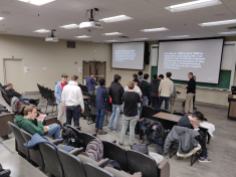
On Saturday night, we hosted our first-ever “Mozilla movie-night” on campus, showing the 2000 documentary “Code Rush.” The documentary covers the open-sourcing of Netscape and the birth of Mozilla. It was pretty impressive to see over 20 college students show up to the Engineering Building at 8:30pm on a Saturday night. Mike and I also did a Q&A with the students before and after the movie about working in open source software, applying for jobs, and more.
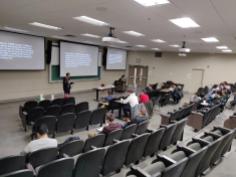
Sunday morning we were back in the computer lab at 9am again for a half-day of hacking. We spent the first hour of the day teaching how to know if a test failure on tryserver is an intermittent failure related to the current patch or a pre-existing and known issue. This is very useful as the students have been pushing their patches to tryserver more often this semester than in previous groups.
This was our sixth time that we’ve hosted a hack weekend with the Capstone team (different team each semester). We schedule these to occur within the first few weeks of the start of the semester to help bootstrap the students on their project. It’s been a very valuable use of all of our time, as it helps the students get some face-time with their mentors, and the mentors get a better grasp of some of the challenges that the students are facing.
Photon Engineering Newsletter #13
18 August, 2017 § 12 Comments
This week I’m taking over for Dolske as he takes a vacation to view the eclipse. This is issue #13 of the Photon Engineering Newsletter.
This past week the Nightly team has had some fun with the Firefox icon. We’ve seen the following icons grace Nightly builds in the past week:




The icon in the top-left was created in 2011 by Sean Martell. The icon in the top-right was the original Phoenix icon. Phoenix was later renamed Firebird, and then the name was later changed to Firefox. The icon in the bottom left was the first “Firefox” icon, designed by Steven Garrity in 2003. The icon in the bottom-right, well it is such logo with much browser, we couldn’t help ourselves to not share it.
Recent Changes
Menus/structure:
The Report Site Issue button has been moved to the Page Action menu in Nightly and Dev Edition. This button doesn’t ship to users on Beta or Release.
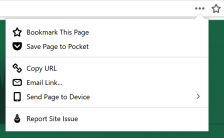
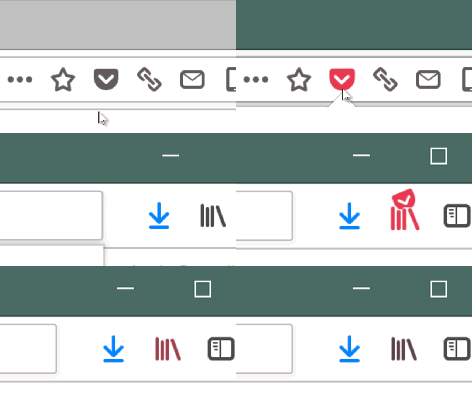
Probably the biggest visual change this week is that we now have spacers in the toolbar. These help to separate the location bar from the other utility buttons, and also keep the location bar relatively centered within the window. We have also replaced the bookmarks menu button with the Library button (it’s the icon that looks like books on a shelf).
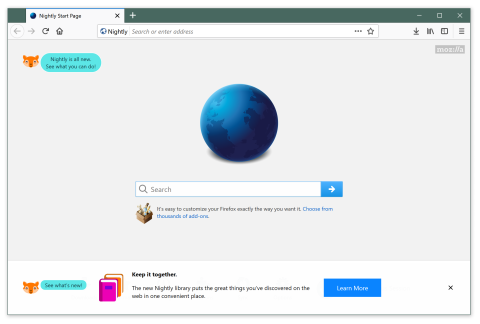
We also widened various panels to help fit more text in them.
Animation:
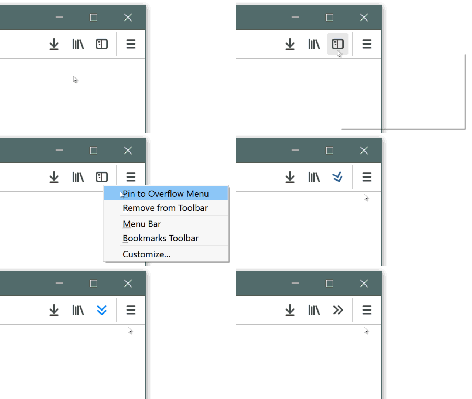
The Pin to Overflow animation has also been tweaked to not move as far. This will likely be the final adjustment to this animation (seen on the left). The Pocket button has moved to the location bar and the button expands when a page is saved to Pocket (seen on the right).
Preferences:
Preferences has continued to work towards their own visual redesign for Firefox 57. New icons were landed for the various categories within Preferences, and some borders and margins have been adjusted.
Visual redesign:
The tab label is no longer centered on Mac. This now brings Linux, Mac, and Windows to all have the same visual treatment for tabs.
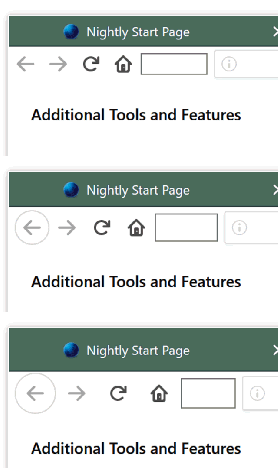
Changing to Compact density within Customize mode changes the toolbar buttons to now use less horizontal space. The following GIF shows the theme changing from Compact to Normal to Touch densities.
Onboarding:
New graphics for the onboarding tour have landed.




Performance:
Two of the main engineers focusing on Performance were on PTO this past week so we don’t have an update from them.
More eslint coverage for Firefox developers
23 January, 2017 § Leave a comment
Since my last post on the eslint work that is happening in mozilla-central, we have increased coverage as well as enabling more rules.
The publication of that post spawned a few conversations, among them Florian Quèze has added a bunch of new Mozilla-specific rules to our eslint configuration and evilpies has started looking at what it would take to run eslint on the JS engine code.
The following rules have been added:
newURIoriginally had three arguments, of which the last two were sparsely used and often hadnullpassed in. Florian convertednewURIto make the last two arguments optional, and wrote a script to remove the unneedednullusages. This now has an eslint rule to enforce it.removeObserverhad many usages that passed an unused third argument offalse. This was most likely done as people were writing code that usedaddObserver(..., ..., false), and thought that they needed to passfalsewhen callingremoveObserver. After that, it most likely got copy-pasted around the codebase. This also now has an eslint rule enforcing people don’t do this again.addEventListenerhas a{once: true}argument that can be used to automatically remove the event listener after it is called the first time. This rule can be applied to any code that was indiscriminately callingremoveEventListener. This work should land very soon, as it just got r+ today. This work is being tracked in bug 1331599.no-undefwork continues to make progress as Mark Banner is now focusing on /services subdirectory. We also have a few more globals defined in our configuration and have more testing globals that are imported automatically through a new rule.quotesis now enabled, requiring double-quotes for strings except in cases where double-quotes are used within the string or if the string is a template literal.
While working on no-undef, Mark noticed that the /services directory wasn’t being scanned by eslint even though it wasn’t listed in the .eslintignore file. The directory was missing an .eslintrc.js file. We now have one added in the directory, though there remain 59 warnings which should be fixed (these are listed as warnings temporarily and will be converted to errors once fixed).
Also of note is that we now have automated tests for the custom rules that we have implemented. You can view these tests in the /tools/lint/eslint/eslint-plugin-mozilla/tests directory.
If you’ve got ideas for new rules that we can add to help clean up the codebase, please comment on this post or contact any of us on IRC on the #eslint channel of irc.mozilla.org.
eslint updates for Firefox developers
10 January, 2017 § 1 Comment
In the past week there has been quite a lot of progress made on the eslint front.
Last week I enabled the following rules for the default mozilla-central eslint configuration (/toolkit/.eslintrc.js):
- no-extra-label
- no-iterator
- no-regex-spaces
- no-self-assign
- no-unsafe-negation
- no-unused-labels
- object-shorthand
- brace-style
- no-multi-spaces
- no-debugger
- no-delete-var
- no-sparse-arrays
- no-unsafe-finally
- no-cond-assign
- no-extra-bind
- no-useless-call
- no-lone-blocks
- no-useless-return
Mark Banner has continued to work on fixing the remaining no-undef errors. This work is on-going and is being tracked by a meta bug.
Florian Quèze just landed a patch yesterday to simplify calls to Services.io.newURI so the two trailing arguments are optional. Previously 99% of the calls to the function passed in null for the trailing arguments. Florian is planning on cleaning up some addEventListener code as well and I am pushing for him to implement special eslint rules along with them to help enforce these changes going forward.
I enabled most of the rules for eslint and gathered counts of the number of errors related to each rule. The following list shows each disabled rule along with the number of associated errors as of mozilla-central revision f13abb8ba9f3:
- array-callback-return = 3
- no-new-func = 13
- no-useless-concat = 14
- no-void = 14
- no-multi-str = 15
- no-new-wrappers = 18
- no-array-constructor = 20
- no-eval = 20
- no-await-in-loop = 21
- no-sequences = 22
- no-inner-declarations = 23
- no-unmodified-loop-condition = 24
- wrap-iife = 25
- no-constant-condition = 28
- no-template-curly-in-string = 39
- no-loop-func = 44
- no-fallthrough = 51
- no-new = 56
- no-throw-literal = 134
- no-prototype-builtins = 158
- no-caller = 165
- no-unused-expressions = 171
- no-useless-escape = 194
- complexity = 208
- no-case-declarations = 238
- guard-for-in = 284
- radix = 342
- no-shadow = 356
- no-eq-null = 442
- dot-notation = 459
- default-case = 485
- block-scoped-var = 749
- no-empty-function = 1144
- dot-location = 2327
- no-extra-parens = 2464
- no-invalid-this = 2947
If you would like to work on fixing any of these, please file a bug in the Toolkit :: General component of Bugzilla and request review from myself, Mossop, or Standard8.
If you’d like eslint to run on a directory that you work in, remove the reference to it from the .eslintignore file located at the mozilla-central root and add a .eslintrc.js file. This will now allow eslint to scan that directory.
Also, another project that someone can pick up is to help us move towards a single rule definition. We would like to move to a single set of rules which will help for consistent coding styling. You can look at this listing of .eslintrc.js files to see the differences between them. Some define globals that are unique to the directory or have different include paths to the root configuration, but some also define extra rules. We would like to get those rules added to the root configuration, though we haven’t determined how to settle rule conflicts yet.
<select> dropdown update 3
14 December, 2016 § 1 Comment
First, let me say that the students working on this project have done a great job. Secondly, let me say that I’ve not done a great job blogging about their work. I will try to make up for it in this post.
Since the previous post a lot has happened: we had our hack-weekend at MSU, the students implemented the features we asked them to work on, a bonus feature got implemented, the students made a video about their project, and then they presented their project as part of their end-of-the-semester Design Day exhibition.
I’ll go through each item of the above list:
Our “hack-weekend” at MSU
On about the fifth weekend of the project, Mike and I visited the MSU campus to work with the students and familiarize them with the project and the Mozilla codebase. We covered all aspects of the tools: Bugzilla, Mercurial, Reviewboard, and the Browser Toolbox. We gave short lessons on interprocess communication, low-level CSS styling implementation, and distributed version control systems.
What worked
- The location and facilities were great. We had solid connections to the internet, a comfortable room, and no hassles.
- The team was very astute and asked many questions as we were going along.
- Bugzilla and Reviewboard seemed to get understood well.
- There was tons of paired programming and hacking on the project, and great career discussions as well.
- The students wrote some amazing automated tests for searching in the dropdown. It is great to give students a real-world project that includes so many parts of good software development (automated tests, code reviews, version control, paired programming, code linting, and fixing regression bugs).
What didn’t work
- I think we should have done the hack weekend a little sooner in the semester. The sooner the better, as we can try to get ahead of any tooling issues, ambiguities in the spec, and technologies that should be covered. For example, at the beginning of the semester I asked that each student complete a set of online tutorials. After going through the lessons I got the feeling that there was still some room to grow and understand more about the programming languages we were using.
- Mercurial seemed very hard to get a grasp of. Some of this may have been due to the paired programming where the students were sharing patches, and the rest is probably due to Mike and I not having a solid plan at the beginning of the semester as to how the students can share and update each others patches. We should probably set up a non-publishing user repo that all students will have access to and push to as they are working on the project.
- The students used Mercurial’s bookmark-based development model, and I still use the Mercurial Queues method. This meant that I wasn’t much help when the students got stuck. I’m switching my development model to bookmark-based development before the next semester starts.
- Two of the groups of students were paired up. This seemed to work OK in the beginning, but soon it seemed that the students weren’t doing a good job of switching off. I think we will try to do less pairing at the beginning, and maybe introduce pairing towards the end once the students have gotten a grasp of the tools, codebase, and project requirements.
The work that got completed
Mark landed the styling changes for the dropdown. The dropdowns now have more padding around each item, show a grey background for theheaders, and have correct hover styling. All of this work was for Windows-only, as Linux and OSX looked fine already.
Mark also landed a patch to increase the padding of items when the dropdown is opened on a touch-enabled device. I landed a small follow-up to only show the increased padding when a touch-event was used to open the dropdown.
Jared landed an OSX-only patch to open the dropdown vertically centered on the selected item. This brings us in parity with Safari on OSX. We may possibly do the same for Windows now that Edge is showing the behavior there, though it is not planned for anytime soon. This feature was a bonus, as we didn’t expect the students to have the time to get to it when the project was started.
The work that is near completion
Tyler and Jared worked on implementing search within the dropdown. The search box only shows up if there are over 40 items in the list, and it will provide live filtering of the menuitems. There are some cool automated tests that Tyler wrote that verify the functionality works. These tests will be easy to expand upon in the future if any regressions are found or the feature is to get expanded. This is pretty close to landing and will hopefully land this week or next, depending on how quick the students are at responding to the review feedback.
Michael and Fred worked on getting single-process Firefox to use the multi-process Firefox implementation of the <select> dropdowns. This work was pretty low-level and required the students to set up a debugger on a separate machine and use remoting to control the browser (to avoid issues with focus changing). This is getting pretty close to landing, but will need a separate bug fixed first before the students can push further on it. I hope we can get it to land in the next couple weeks.
Project video
As part of the course requirements, the students made a video to showcase their work. Watch below, it’s pretty good (and funny too!)
Sorry for not blogging about their project more often. The students did a great job on the project and we hope to see them stay active in the Mozilla community going forward.

 JAWS
JAWS 